本次目标我们主要讲解引入wordpress外部库并测试。
我们将一些外部库和工具包放入到pkg项目,方便其他项目引用。
1.安装go-wordpress库
进入到pkg项目
go get github.com/robbiet480/go-wordpress
2.编写工具类
我们在添加station的时候,在之前的代码中我们有几个todo,现在我们将这几个todo进行处理。
// todo 校验wordpress账号密码
// todo 加密密码
// todo 自动获取服务器ip
在pkg包下创建 wordpressutil目录,创建wordpressutil.go文件,编写 创建客户端和测试账号密码方法。
wordpressutil.go
package wordpressutil
import (
"context"
"fmt"
"github.com/robbiet480/go-wordpress"
)
// 创建wordpress客户端
func Client(DomainName string, Username string, Password string) (client *wordpress.Client, err error) {
Url := fmt.Sprintf("%s/wp-json", DomainName)
tp := wordpress.BasicAuthTransport{
Username: Username,
Password: Password,
}
// create wp-api client
client, err = wordpress.NewClient(Url, tp.Client())
if err != nil {
return nil, err
}
return client, nil
}
// 测试账号是否正确
func Test(DomainName string, Username string, Password string) error {
client, err := Client(DomainName, Username, Password)
if err != nil {
return err
}
_, r, err := client.Users.Me(context.Background(), nil)
if err != nil {
return err
}
if r.StatusCode != 200 {
return fmt.Errorf("账号验证失败")
}
return nil
}
3.编写测试类
编写完工具方法后我们需要对接方法进行测试。
测试之前我们需要先准备到wordpress的账号和密码。
在wordpressutil.go同级目录创建 wordpressutil_test.go文件。
测试类需要引入testing包,测试方法以Test开头,参数为*testing.T。下面是一个Test函数的典型定义
import "testing"
func Test_test(t *testing.T) {
}
wordpressutil_test.go
package wordpressutil
import (
"context"
"fmt"
"net/http"
"testing"
"github.com/robbiet480/go-wordpress"
)
func getClient() (client *wordpress.Client, err error) {
client, err = Client("https://xxx.com/wp-json/", "admin", "xxx")
if err != nil {
return nil, err
}
return client, nil
}
// 测试Client函数
func Test_getClient(t *testing.T) {
client, err := getClient()
if err != nil {
fmt.Println(err.Error())
}
media, resp, _ := client.Media.List(context.Background(), nil)
if resp != nil && resp.StatusCode != http.StatusOK {
t.Errorf("Expected 200 OK, got %v", resp.Status)
}
if len(media) < 1 {
t.Fatalf("Should not return empty comments")
}
fmt.Println(media)
}
// 测试Test函数
func Test12(t *testing.T) {
err := Test("https://www.xxxxx.com/wp-json/", "gxx", "xxx")
if err != nil {
fmt.Println(err.Error())
}
}
// 测试Create_User函数
func Test_Create_User(t *testing.T) {
client, err := getClient()
if err != nil {
fmt.Println(err.Error())
}
user, _, err := client.Users.Create(context.Background(), &wordpress.User{Username: "test", Email: "test@test.com"})
if err != nil {
fmt.Println(err.Error())
}
fmt.Println(user)
}
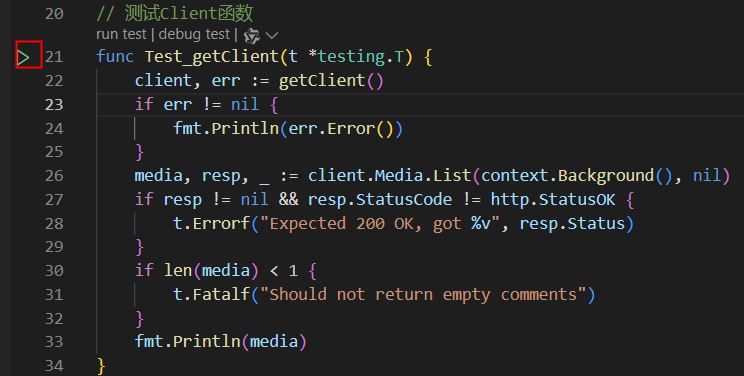
如果你使用vscode在测试函数旁边有个测试按钮,直接进行测试。其他的ide也是类型的操作。
右键点击有更多操作下拉.
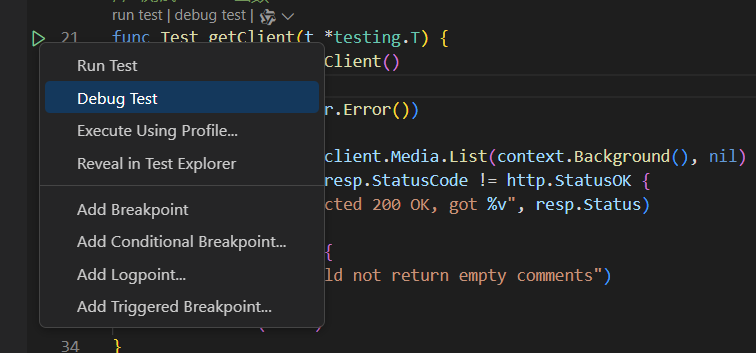
测试完成后们就可以在业务代码中使用了。使用时把 pkg/wordpressutil包import即可使用
4.编写其他工具类
有了上面的流程我们在引入下其他的工具类。由于涉及到密码所以我们存入数据库时需要进行加密,因此需要编写一个加密解密工具。
在pkg包下创建 encryption目录,创建encryption.go文件
encryption.go
package encryption
import (
"crypto/aes"
"crypto/cipher"
"crypto/rand"
"crypto/sha256"
"encoding/base64"
"fmt"
"io"
)
// AES加密函数
func AESEncrypt(plainText, key string) (string, error) {
// 创建 AES 加密器
block, err := aes.NewCipher(createHash(key))
if err != nil {
return "", err
}
// 使用 GCM 模式
gcm, err := cipher.NewGCM(block)
if err != nil {
return "", err
}
// 创建 nonce
nonce := make([]byte, gcm.NonceSize())
if _, err = io.ReadFull(rand.Reader, nonce); err != nil {
return "", err
}
// 加密数据
cipherText := gcm.Seal(nonce, nonce, []byte(plainText), nil)
return base64.StdEncoding.EncodeToString(cipherText), nil
}
// AES解密函数
func AESDecrypt(cipherText, key string) (string, error) {
// 将密文解码
data, err := base64.StdEncoding.DecodeString(cipherText)
if err != nil {
return "", err
}
// 创建 AES 解密器
block, err := aes.NewCipher(createHash(key))
if err != nil {
return "", err
}
// 使用 GCM 模式
gcm, err := cipher.NewGCM(block)
if err != nil {
return "", err
}
nonceSize := gcm.NonceSize()
if len(data) < nonceSize {
return "", fmt.Errorf("ciphertext too short")
}
// 解密
nonce, cipherTextByte := data[:nonceSize], data[nonceSize:]
plainText, err := gcm.Open(nil, nonce, cipherTextByte, nil)
if err != nil {
return "", err
}
return string(plainText), nil
}
// 创建哈希函数
func createHash(key string) []byte {
hash := sha256.New()
hash.Write([]byte(key))
return hash.Sum(nil)[:32] // AES-256 密钥需要32字节
}
encryption_test.go
package encryption
import (
"testing"
)
func TestEncryption(t *testing.T) {
res, err := AESEncrypt("hello", "12345678")
if err != nil {
t.Error(err)
}
t.Log(res)
t.Log("---------------------")
res, err = AESDecrypt(res, "12345678")
if err != nil {
t.Error(err)
}
t.Log(res)
}
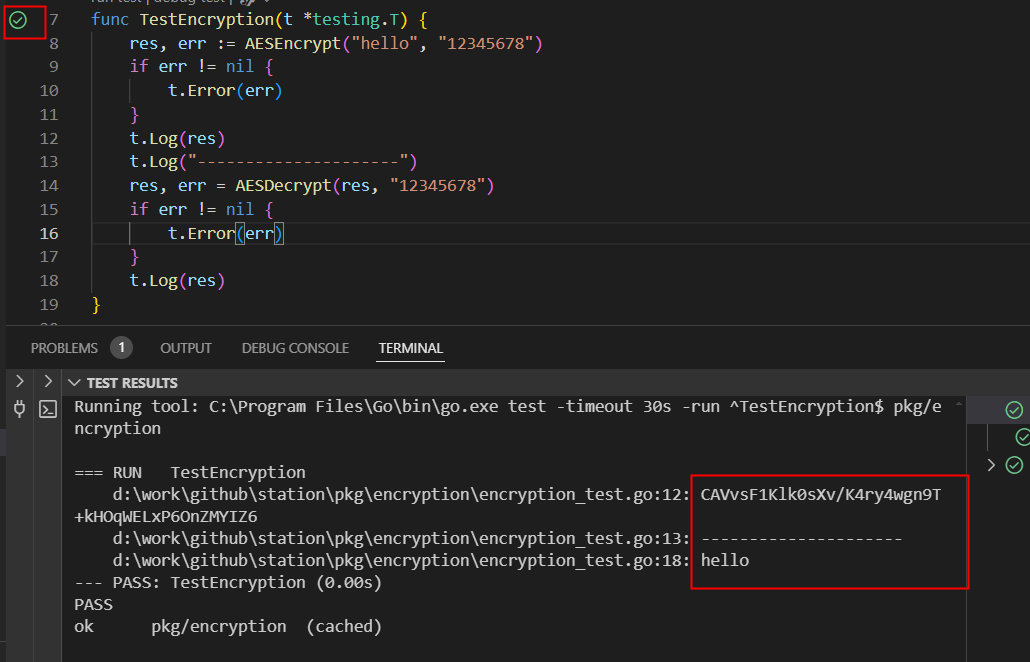
同样的方式进行测试
iputil.go
package iputil
import (
"errors"
"net"
"net/http"
"net/url"
"strings"
)
func GetIP(r *http.Request) (string, error) {
ip := r.Header.Get("X-Forwarded-For")
for _, i := range strings.Split(ip, ",") {
if net.ParseIP(i) != nil {
return i, nil
}
}
ip, _, err := net.SplitHostPort(r.RemoteAddr)
if err != nil {
return "", err
}
if net.ParseIP(ip) != nil {
return ip, nil
}
return "", errors.New("no valid ip found")
}
// 获取域名ip
func GetDomainIP(domain string) (string, error) {
domain, err := extractDomain(domain)
if err != nil {
return "", err
}
ips, err := net.LookupIP(domain)
if err != nil {
return "", err
}
for _, ip := range ips {
return ip.String(), err
}
return "", errors.New("no valid ip found")
}
// 提取域名
func extractDomain(u string) (string, error) {
if strings.Contains(u, "http") {
parsedUrl, err := url.Parse(u)
if err != nil {
return "", err
}
return parsedUrl.Hostname(), nil
}
return u, nil
}
我们同样进行测试,这里就不直接复制出,大家可以自行测试练习。
5.业务代码调用
编写完工具类后,我们对之前业务代码中的todo 逻辑进行补全。
在addstationlogic.go中我们在之前的todo处进行逻辑处理
addstationlogic.go
func (l *AddStationLogic) AddStation(in *types.StationInfo) (resp *types.StationInfoResp, err error) {
//校验wordpress 账号密码
err = wordpressutil.Test(in.DomainName, in.UserName, in.PassWord)
if err != nil {
return nil, err
}
// 加密密码
pw, err := encryption.AESEncrypt(in.PassWord, l.svcCtx.Config.Secret.AESSecret)
if err != nil {
return nil, err
}
info := &station.StationInfo{
Id: in.Id,
DomainName: in.DomainName,
DomainYear: in.DomainYear,
GoogleWeight: in.GoogleWeight,
Type: in.Type,
Industry: in.Industry,
UserName: in.UserName,
PassWord: pw,
ArticlesNum: in.ArticlesNum,
Ip: in.Ip,
}
// 自动获取服务器ip
if info.Ip == "" {
ip, _ := iputil.GetDomainIP(info.DomainName)
info.Ip = ip
}
// 后的代码省略了
}
这样我们完成了外部公共库的引入和使用。
完整代码查询 6wordpress外部库的引入和测试 代码分支 。
5.总结
引入公共库,工具类时,我们可以对其进行测试。测试使用testing,通过测试我们可以快速验证工具能力。测试做的完善可以大大减少我们bug量。
本文作者 xulin(海鸥技术部落),原载于团队 GitBook 技术 Wiki。
WordPress 站群实战 6:外部库的引入和测试
本次目标我们主要讲解引入wordpress外部库并测试。 我们将一些外部库和工具包放入到pkg项目,方便其他项目引用。 1.安装go-wordpress库 进入到pkg项目 2.编写工具类 我们在添加station的时候,在之前的代码中我们有几个todo,现在我们将这几个todo进行处理。 在pkg包下创建 wordpressutil目录,创建wordpressutil.go文件,编写 创建客户端